DJ booking software and CRM for your gigs
RegiaPro is DJ booking software for DJs and sound and lighting hire companies who play weddings, parties and club nights: the CRM keeps the couples who asked about a date in view, while the management side handles quotes, contracts, deposits, travel and invoices for every gig. The walkthrough just below starts from the “Music, DJ or sound hire” option.


Built for more than 50 trades: this one is already set up for yours

Saturday 13 June: already booked
you see it before you write the quote
Today in RegiaPro
Example with made-up data
18
Enquiries
+6 this month
11
Dates confirmed
+3 this month
€3,450
To be collected
2 deposits on the way
New enquiry for 13 June
2 min ago
Contract signed, deposit recorded
yesterday
WhatsApp reminder ready for tomorrow
yesterday
- Free for 14 days, no card needed
- Works in the browser, on your phone too
- Calendar synced with Google and iCloud
- WhatsApp messages already written
- Invoices from your Fatture in Cloud, from the Pro plan
- Public prices, the same for everyone
Type of work
What do you do? If you can’t find yours, the last option is just fine.
What do you need? The basics for DJ booking software and CRM for your gigs are already switched on. Switch on what you really need: we pick the package from here.
Your RegiaPro is ready.
Tap a plan: below you see what is inside.
There is only one price list. Photo galleries come with every plan: if you don't deliver photos you simply don't open them, and the price stays the same. Compare all the plans
What you get with
The menu
An enquiry record
The fields of your trade are highlighted
The stages of the job
Where every job stands, at a glance
A DJ’s calendar fills up in blocks: May, June and September for weddings, Fridays at venues, December for office parties. Enquiries arrive at night on WhatsApp, quotes change with the rig, and payments sometimes come in the same night, sometimes weeks later. DJ booking software is there so nothing disappears between one gig and the next. In RegiaPro every date has its own record, which you update from your phone at the decks or from your computer at home, and the lightest subscription is €19.90 a month.

What you’ll find inside RegiaPro: from enquiry to the day of the event
One program for enquiries, documents, payments and the working day. Tap a card to see how it works.
-
One record per client
Calls, quotes, contracts and payments in date order: when they call back six months later, you know at once where you left off.
The Lead module -
Who to call back today
Every morning, the list of people to get back to, with the WhatsApp message already written. It goes from your own number, when you decide.
Follow-ups and messages -
Quotes from your own template
The PDF with your logo, sent as a link: you know when it was opened. If there is no reply, the program brings it back to you after 3, 7, 14 and 30 days.
The quote -
The contract without retyping
It comes from the accepted quote, with the details already in, and comes out as a PDF ready to sign. From the Pro plan.
Which plans include it -
The day of the event
The stops of the day with checked addresses and the time to leave, worked out on the traffic expected for that day.
The working day -
Delivery galleries
Photos delivered with your own link, with a password and an expiry date: the client views and downloads.
RegiaPro Gallery -
Deposit, balance and invoice
Deposit and balance are recorded separately, each with its own date. The invoice comes out of the record with numbering that carries on by itself: from the Pro plan, with the XML file from the Studio plan.
The plans compared -
The calendar you already have
Appointments and jobs in your phone’s calendar: RegiaPro connects to Google Calendar and iCloud.
The connected calendar -
What is really left
A job’s costs come off that job, the business costs off the year: in December you know what is left, not just what came in.
The figures of each job -
From your phone, on site
It works in your phone’s browser: open the client’s record and attach photos and documents, up to 15 MB each.
How it works
RegiaPro up close: the real screens
This is what the program looks like inside. Sample data: the clients, the jobs and the amounts are made up.




DJ and event sound hire software: weddings, venues and parties
RegiaPro is for the mobile DJ who works alone, and for the small sound hire company renting out a PA and lighting with one or two technicians. Every gig is a job with its own date, times and payment.
Wedding DJs, from the drinks reception to the party
The longest and most planned night: drinks reception, dinner, cake cutting, party. It’s booked months ahead and often includes a microphone for the ceremony and lighting in the room.
Regular venue nights, paid at the end of the month
Regular or one-off dates, with a manager who pays at the end of the month. One record per gig lets you know which dates have been paid and which haven’t.
18th birthdays, anniversaries and Christmas dinners with a DJ
18th birthdays, anniversaries, Christmas dinners. When a company is paying for the night, you link it on the record as the billing party with its VAT number and recipient code.
Sound and lighting hire for bands, conferences and fashion shows
A PA for a band, sound for a conference, lighting for a fashion show. The job is hire with setup: date, load-in and load-out times, technician and travel.
The confirmed gigs to enter first
Start with the gigs already confirmed from now to the end of the year: date, time, venue, client and deposit received. On the calendar you see your free Saturdays before replying to the next message.

CRM for DJs: couples’ and venues’ enquiries, and who to follow up
Couples looking for a wedding DJ contact three or four and decide weeks later. The RegiaPro CRM tells you every morning who is still undecided.
“Are you free on 12 June?”: the midnight enquiry
“Are you free on 12 June?” arrives on WhatsApp while you’re playing. As soon as the set is over, or when you wake up, you create a record for whoever wrote with their contact and the date requested, and pick the ready-made message to reply: WhatsApp opens with the text already written.
The Saturday already taken by another party
In the calendar there’s the “Free dates” panel: every booked day shows who has it, even if that gig is still being negotiated. In the morning, before replying to the couple who wrote overnight, you open it and know whether you can confirm or suggest another date.
The DJ quote nobody comments on
Once sent, the record goes to “Quote sent” and comes back among the people to follow up at three, seven, fourteen and thirty days. In the week before the date RegiaPro stops suggesting chasers.
Three buttons after messaging the couple
On the Tasks page you say how it went: “Done, I wrote” moves the follow-up forward, “They replied” moves the couple to negotiating, “No answer” closes the enquiry.
Venues, photographers, Instagram: where your gigs come from
A venue that saw you play, a photographer who recommends you, Instagram, wedding directories. The Report tells you which channels bring in paid gigs.

Wedding DJ prices: hours, PA and lighting in the quote
Couples compare wedding DJ prices by looking at the total, but they choose by reading what’s included. A clear quote avoids the question “and is the ceremony microphone included?”.
Hours of music, PA and lighting to write in the note
- hours of music and finish time;
- drinks reception, dinner, cake and party: which moments you cover;
- a PA suited to the number of guests and to the room or garden;
- lighting, smoke machine, microphones;
- setup and pack-down, with arrival time;
- an extra hour of music and what it costs.
The gig quote PDF
On the record you enter the agreed fee and generate the quote with your logo. The first line shows the type of party, the date and the town with the fee; hours, PA and lighting follow straight after, in the notes. On the flat-rate scheme VAT isn’t added; if you charge it, the program works it out from within the agreed amount.
With moving heads or without
The couple asks what it costs without the moving heads? On the party’s record you lower the fee and get a second proposal with the next number, while the one with the lights stays in the archive.
The music packages text for the first contact
Among the ready-made texts there’s one for sending your packages: you rewrite it once in your own words, and for each couple it opens in WhatsApp already filled in.
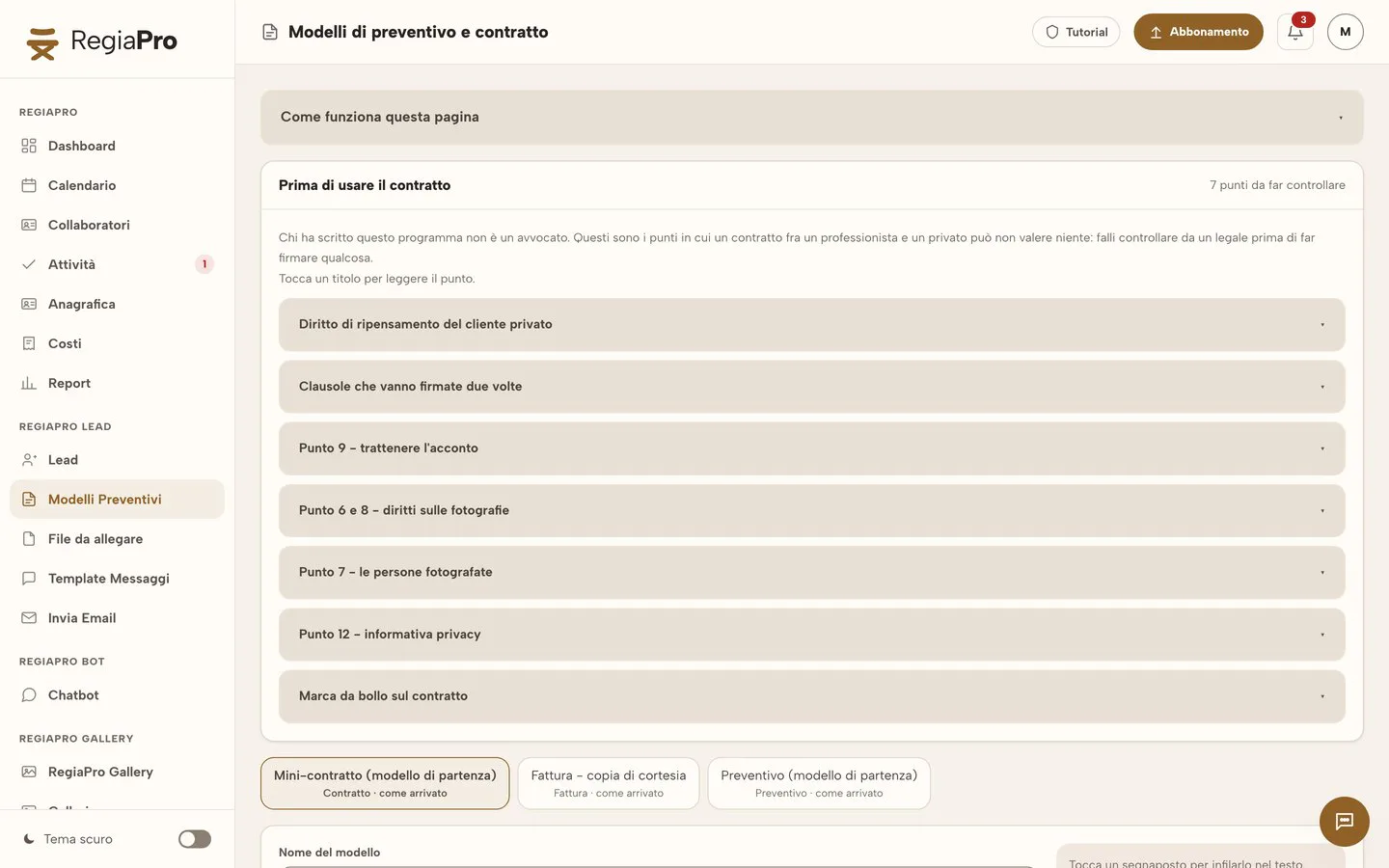
How much a DJ earns: a month of gigs in your software
You only see how much a DJ earns by taking the technician, hire and mileage off the fees. Here is an imaginary June for a DJ with a small sound hire business, gig by gig. Clients and figures are made up and are only an example.
-
Fee, lighting technician and hire: how you get to the “Left” column
Each row is a record. The fee is the gig’s amount; the lighting technician is the collaborator with their cost; hire, such as an extra sub or a riser, counts as out-of-pocket costs; travel is the return-trip estimate RegiaPro makes from your base. The “Left” column is the subtraction done by hand for the example; the Report does the same sum for the whole month and by type of party, with the average per gig.
The quote from your template -
The 12 June farmhouse wedding, up close
The couple write in February, receive the €1,300 quote and sign in March, leaving a €300 deposit. In the important note you write “check who is applying for the SIAE music licence”: the reminder appears on 5 June. On the wedding night you collect the €1,000 balance and log it from your phone.
The quote from your template -
The two nights at the seafront venue
The seafront venue’s manager pays for both dates with a single bank transfer at the end of the month. On both records you mark the balance with the same payment date: in the jobs list both move from to-collect to paid.
Invoices and payments in the plans -
New speakers and the van: what a month of gigs doesn’t tell you
New speakers, the van, music subscriptions: these are outgoings that don’t belong to any one gig. You log them under business costs, each in its own category, and the Report sets them beside your gig margin to show your real profit for the year.
The figures of each job
A DJ’s June in a table (example with made-up data)
| Date | Gig | Fee | Lighting technician | Hire | Travel | What's left |
|---|---|---|---|---|---|---|
| 5 June | Office party in a winery | €900 | €120 | — | €48 | €732 |
| 6 June | Friday at a seafront venue | €350 | — | — | €22 | €328 |
| 12 June | Farmhouse wedding | €1,300 | €150 | €90 | €85 | €975 |
| 19 June | 18th birthday at a villa | €700 | — | — | €36 | €664 |
| 20 June | Wedding with a garden ceremony | €1,500 | €150 | €140 | €110 | €1,100 |
| 26 June | Friday at the 6 June venue | €350 | — | — | €22 | €328 |
| Total | Six gigs | €5,100 | €420 | €230 | €323 | €4,127 |
DJ contract: times, equipment and terms for the night
A DJ’s or sound hire company’s contract is mainly there to set times and responsibilities. It’s the sheet you reread when, at two in the morning, someone asks for “one more hour”.
Useful clauses in a gig contract
- arrival time, music start and finish times;
- cost of each extra hour;
- equipment brought and power supply required from the venue;
- who handles music licences;
- what happens with rain or if outdoor music is banned;
- deposit, balance and cancellation terms.
The DJ contract generated from the party’s record
On Pro, you generate the contract from the party’s record. You write your clauses once; for each gig the program adds client, date, music start and finish times, town, fee, deposit and balance due.
The couple sign before the night
You have it signed in pen before the night, in person, or you download the PDF, send it to the couple yourself and have them return it signed. You upload the signed copy to the party’s record, along with the proposals.
Want to see it with your own work?
Fourteen days with the Full plan features, no card needed. Then you decide.


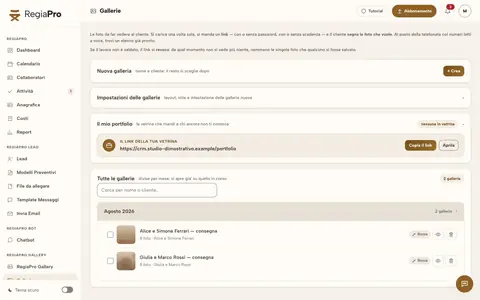






Free photos from Pexels and real screenshots of the software, with made-up data.
Tech rider and SIAE licence: the gig’s documents on the record
A successful night also depends on two sheets of paper: the tech rider, which tells the venue what you need, and the music licences. RegiaPro keeps them next to the job they belong to.
The tech rider attached to the party
On the record you add the rider as a PDF, the room plan with the sockets and photos of the stage; each file can be up to 15 MB. The day before you reopen them on your smartphone while loading the van.
The reminder for the SIAE licence
Who applies for the SIAE music licence is decided in the contract. If it’s you, add it as the party’s important note: seven days before the date it comes back up among your tasks.
The couple’s song list
The song list the couple send on WhatsApp or by email you save among the record’s attachments, so you don’t have to hunt for it in your messages.
Start and finish times on the calendar
Every confirmed gig also goes into your smartphone’s diary, Google Calendar or iCloud, from start time to music finish time. Move it on your phone and after a few minutes the gig changes day inside RegiaPro too.
Store, church and venue: the route to the party
On confirmed gigs you can add up to six stops, such as store, church and venue: RegiaPro opens the route in Google Maps and suggests what time to leave so you can set up calmly.
Sound and lighting hire: collaborators, travel and payments
For a sound and lighting hire company, what an event earns depends on how many people and how many cubic metres of kit you move. Logging costs on each event’s record is the first step to seeing, in the month-end Report, which kinds of work pay off.
Sound engineers and crew
The sound engineer or crew member who set up with you goes on that gig’s record, with their name and the fee you paid them: that way the figure stays tied to the right job.
Speakers and lights hired in for a big event
When you hire in an extra PA or extra lights for a big event, you add it under out-of-pocket costs with a note reminding you what it was.
The van with the rig to the party’s town
With your Google Maps key saved in Settings, the “Calculate” button next to the party’s town counts the mileage there and back and estimates what you spend on diesel, tolls and hours at the wheel.
Deposits, balances and gig invoices
You log every deposit with its date and payment method, and the rest of the fee can come in several instalments. With Pro the gig invoice comes from its record, numbered in sequence with the others that year; if you move to Studio you can export every invoice in the XML format required by the SdI.

The program as it really is, filled with test jobs: at the top each month’s confirmed gigs with takings, below the list with deposits received and jobs already paid in full.
How to start: three steps, no card needed
You sign up, try it on your real work, and only decide at the end.
-
Sign up in a minute
Your name, your business name and your email. We don’t ask for a credit card: access starts when you confirm your email.
Start the trial -
Set it up for your trade
Menus, record fields and job stages speak your language. You connect the calendar you already use.
Choose your trade here -
Try everything, then choose
Fourteen days with the Full features. At the end you choose a plan, or you stop: nothing renews on its own.
See the plans
DJ software: mixing programs, hire or management with CRM, and what it costs
Among the pages that came up when searching for DJ software or sound hire management software, in mid-September 2026, there are three kinds of tool, each covering a different stage of the work.
| Mixing software | Hire management software | Business software and CRM like RegiaPro | |
|---|---|---|---|
| Stage of the work | The night at the decks | Stock and equipment out | From the client’s enquiry to payment |
| What they hold | Tracks, playlists, effects | Inventory, availability, hire sheets | Records, quotes, contracts, deposits, travel, invoices |
| Who it's for | Anyone who plays | Sound hire firms with lots of kit | DJs and small sound hire firms who look after their clients |
| Price | Depends on the software | On request or by subscription | Published: from €19.90 a month |
Start, €19.90 a month: your first gigs in the client book
€199 if you pay twelve months in advance. Unlimited gigs in the client book, follow-ups to track, ready-made messages to open in WhatsApp, 10 proposals a month at most.
Pro, €34.90 a month: a contract for every party and its invoices
€349 if you pay twelve months in advance. Gig contracts, numbered invoices and no monthly cap on quotes, for those who play all year round.
Studio, €59.90 a month: XML for the sound hire firm that invoices a lot
€599 if you pay twelve months in advance. Adds XML e-invoicing, WhatsApp support and a guided setup with us.
A 14-day trial on this season’s gigs
Fourteen days with Full unlocked, and no card to register. Leave your email, confirm, choose a password and you’re in within minutes.
Why you can trust it: your data stays yours
What matters before you put your clients into a new program.
Your data stays in Europe
On servers in Europe. Each business sees only its own data: the database itself enforces the separation.
If you stop, your data stays yours
The account goes read-only and nothing is deleted unless you ask. We send you a copy in a readable format.
Prices written up front
A public price list, the same for every trade: you can read it on the pricing page before you sign up.
You talk to a person
Born in a studio in Tuscany, not in an office. Write to info@regiapro.it or use the contact page.
DJs’ FAQ about RegiaPro
Can I log several gigs on the same weekend?
Yes. Every gig is a record with its own date and time, and on the calendar you see all the confirmed ones. The free dates panel also shows gigs still under negotiation, so before accepting another one you know what’s pending.
How do I put the PA, lighting and extra hours in the quote?
On the record you enter the overall fee; in the proposal notes you list hours of music, PA, lighting, microphones and the price of an extra hour. The couple see the total highlighted and, straight after, every item explained in your own words.
Does the lighting technician count in the gig’s numbers?
Yes. The technician’s name and fee go on the party’s record; in the Report that figure, along with hire and travel, is taken off your takings, and you see the month’s margin and the average per gig for each type of party.
The venue pays me at the end of the month: how do I track it?
One record per gig, with the manager as the client. When the transfer arrives you mark the payment on the gigs it covers; in the jobs list you see which are paid and which are still to collect.
Can I attach the tech rider and the running order?
Yes. On the gig’s record, once saved, you upload the rider, the room plan and the couple’s running order, as PDF, Word or images: up to 15 MB each, and you can reopen them on your phone when needed.
Does it remind me about licences before a party?
Write the task in the record’s important note, for example the music licence: seven days before the date it becomes a reminder among your tasks, and if the date changes the deadline moves with it.
Do couples get messages without me knowing?
You send every message yourself. RegiaPro prepares the text and tells you who to contact today; “Open WhatsApp” opens the chat with the message ready and it goes out from your own number.
Do I need a computer?
Your phone is enough: RegiaPro works in the browser. Many DJs update their records between gigs on their smartphone and use the computer only for contracts and invoices.
Features retested one by one in the program on 14 September 2026. The gigs, venues and fees on this page are fictional, and the three kinds of tool come from searches made in those days. Found a description that doesn’t match your RegiaPro? Let us know by writing to info@regiapro.it.
Try the DJ booking software on this season’s gigs
Put the gigs you’ve already booked and your next enquiry into RegiaPro, and watch it go from message to final payment: in fourteen days you’ll know whether it makes your weekends simpler. Full stays switched on for the whole trial.
The people you work with at parties: wedding planner software, catering software, photographer software and videographer software.