Eight modules.
One client, entered once.
RegiaPro isn’t a bundle of different programs put together: it’s one single program, split into eight parts that share data with each other. The couple who writes to you in January becomes the quote in February, the contract in March, the gallery in July and the posts in August — without you ever having to type their name again.
How to read the labels
Next to every module you'll find where it really stands. Live means it works and is used every day. Being built means it is designed and tested but not finished: it won't be there when you sign up. We would rather write it here than let you find out later.
They mark the shots they want themselves.
Delivery stops being a WeTransfer link that dies after seven days. It becomes a client gallery of your own, with your name on it, that the couple can browse, download and show to their families — for as long as you decide.
- One link, one password, one expiry date. You set them, gallery by gallery. And when you hit "archive", the link really does go dead.
- The original never leaves. The browser only ever gets reduced versions, made by RegiaPro. The file that came out of the camera stays where it is.
- GPS location is stripped out. Cameras write into every frame where it was taken. At a wedding that line says where the bride lives: RegiaPro deletes it from the published copies.
- Photos and video together, in the folders you organised them into.
- On every plan, with storage that grows with the plan: 100 GB on Start, 300 GB on Pro, 1.5 TB on Studio. On every plan the gallery carries your own brand, and ours appears nowhere. If the space is not enough, add 100 GB of photos for €5 a month (€4 on the Studio plan) without changing plan.
- Your guests’ photos, from a little square they scan. It is called Live Moments, it lives inside the galleries and it switches on from the Full plan up: they send, you approve.
- Event photos for sale, to the people who were there. It is called Photo Shop: you switch on sales for a gallery and RegiaPro keeps a percentage of each sale, from 12% down to 0% depending on the plan.
- Prints and albums, ordered from the gallery. Your client picks them and pays online, and can lay out the album themselves; you set the markup and the parcel goes out in your studio’s name. On every plan, Free included. See prints, photo books and gifts
Live Moments: the photos your guests took
Every gallery can open a collection for the guests. You print one of the six sheets RegiaPro prepares for you — with your logo, your colours and your typeface — and guests scan it with their phone: they send photos and videos with nothing to download and no sign-up. You look at what arrives and you decide: whatever you approve goes into the couple’s gallery, in a «Guests» section kept apart from your own work.
Why we make so much of the data
A wedding gallery holds photographs of dozens of people, often children. It isn't a folder of files: it is personal data belonging to people who signed nothing with us. That is why everything sits on servers in Europe, and why the EXIF is thrown away rather than "usually not".

Close-up of the same screen, cropped to what matters.

Real screenshot from the software. Names, amounts and contact details are made up.

The four steps to send a gallery. Real screenshot from the software. Names, amounts and contact details are made up.
Event photos for sale to the people who were there.
At a wedding, a race or an end-of-year recital, lots of people want the photos: guests, relatives, athletes, parents. With the Photo Shop the event gallery becomes a gallery for sale: the people who were there find their photos, pay by card and download them.
- You switch it on gallery by gallery, with a single switch. Three price lists ready to use, with single photos and bundles: change them as you like.
- Previews carry a watermark. The clean photo arrives after payment, with a download link by email.
- The printable QR code is ready: the “Find your photos” sign, the table card and the race bib, in your colours and your font.
- The people who were there find their photos by bib number or by day, on every plan. On Full also with a selfie, which is never saved: you decide whether to switch on face search.
- The money arrives in your account, with the percentage already taken off. You see orders and takings in the Photo Shop panel.
When you start selling
As soon as you connect the account where you receive the money: you do it once, from the Photo Shop panel. Card payments go through Stripe.
What RegiaPro keeps on each sale
| Your plan | On each sale |
|---|---|
| Free | 12% |
| Start and Pro | 3% |
| Full and Studio | 0% |
Free: 12%, never less than €0.50 and the card fees. Start, Pro and Full: the plan’s percentage plus card fees. Minimum order €5; on Free, photos start at €4. Switching on sales costs nothing on top of your plan.
Three thousand frames culled in minutes.
The one part that doesn't run in the browser but on your own Mac, because it has to read three thousand RAW files and nobody wants to upload those anywhere. It exists to kill off the dullest part of the job: the first cull.
- Fast because it doesn't develop the RAW. The camera has already put a preview inside every file: reading that instead of developing the frame is 17 to 58 times faster (measured on real files, Sony and drone). A 3,000-frame wedding is analysed in minutes.
- It groups the bursts and picks out the best frame in each one for you. You correct it from the keyboard, fast.
- It asks what kind of shoot it is first — wedding, property and drone, portraits, event, sport, graduation — so it knows what to expect instead of guessing.
- It recognises bracketing and leaves it alone. The three or five frames at different exposures for an HDR look exactly like a burst, but they aren't five attempts: they are five pieces of one photograph. Software that keeps one and discards the rest ruins your work.
- It flags motion blur, missed focus and bad exposure, and writes down why.
- When it isn't sure, it suggests nothing and says so. That is the most important rule of the lot.
It never deletes anything. Ever.
The whole time it works on a list, not on the files: your RAWs stay where they are, untouched. Only when you press "Apply to files", and only after it has shown you exactly how many files it will touch and where, are the keepers copied and the rejects moved into a subfolder alongside. No wastebasket, no deletion. If one day you want the space back, you delete them yourself, by hand.
Where it really stands
It exists, and it is installed and tested: you download it from your account and it runs on any Mac with macOS 11 or newer. It is included in the Pro, Full and Studio plans and in the 14-day Full Trial, which switches on every Full feature. It is not included on Start, but you can try it: the trial licence expires and stays tied to your account.

A close-up of the same screen, cropped to the part that matters. Under every reject it says why, with the button to put it back.

Real screenshot from the software. The photos shown inside are test images.

The tally before it touches a single file, saying where everything ends up.
It answers passers-by, and writes the record for you.
These are two different things sharing a name, for two different moments in the day: one talks to people who don't know you yet, the other talks to you.
1. The chat on your website
A little bubble at the bottom right of your site. It answers the questions visitors ask — how much is a wedding, do you do drone work, are you free in September — and once it knows who they are and how to reach them, it creates the record on its own. You find it the next morning in your follow-up list, without having read the conversation.
2. The assistant inside the software
A box where you write in plain English: "draft a quote for Mario Rossi, wedding in Pistoia on 12 June", or "write a polite message asking the Bertellis for the deposit". It prepares the draft. It does not send it.
The rule that never changes
The assistant never decides on its own who you mean. If there are three Rossis in your list, it shows you all three and waits for you to choose. And whatever it prepares — a quote, an email, a WhatsApp message — stays a draft until you are the one who presses send.
The spending cap
The part that writes the text costs something on every request, so it has a monthly cap and a counter you can see. And the chat on your site has a per-visitor message limit, so nobody can blow up the bill by typing non-stop.

A close-up of the same screen, cropped to the part that matters. The last column holds the contact that came out of the chat.

Real screenshot from the software. Names, amounts and contact details are made up.
Every morning you know who to follow up today.
This is the heart of it — the CRM for photographers underneath everything else. Everyone who contacts you becomes a record, and the record keeps everything that happened in order: the phone call, the quote, the message, the meeting, the deposit. When that person rings back six months later, in three seconds you know who they are and where you left off.
- The client's timeline. Everything done or received lands in one single list. There isn't one place for emails and another for notes: there is one place.
- Quote → contract → invoice. The quote is built from a template of yours, becomes a contract without retyping a thing, and the invoice comes out of that. Always unlimited.
- Follow-ups that put themselves forward. With the message already written, suited to the kind of shoot and to where you have got to.
- Connected calendar. Appointments land in your Google Calendar too — the one already on your phone.
- Documents kept safe. Quotes and contracts are sent on a link nobody can guess; invoices never leave the software at all.
- Price lists and packages. Those do get a readable link, because they end up in a WhatsApp message, and a link you can read builds trust.
How the follow-ups are worked out
After a quote: on day 3, then day 7, day 14, day 30. After a first enquiry with no quote: day 2, day 5, day 10. With two rules that matter more than the schedule: never two follow-ups less than three days apart (so if you come back from a week of shooting you don't find three messages queued for the same person on the same day), and no follow-ups in the week before the shoot, because by then they would be out of time.
If the software sits switched off for five days
Nothing bad happens: when you open it again, the whole backlog is waiting. "Who should I follow up today" is a question asked on the spot, not a service that has to stay running in the background — so there is no background service that can quietly stop working without telling you.

Close-up of the same screen, cropped to what matters.

Real screenshot from the software. Names, amounts and contact details are made up.

The list, with the year month by month. Real screenshot from the software. Names, amounts and contact details are made up.

Real screenshot from the software. Names, amounts and contact details are made up.
Courses, live streams and webinars, next to your clients.
For people who teach their craft: the photographer with workshops, the dog trainer, the drone school, the make-up artist who trains colleagues, the consultant with webinars. All in the same program as your clients and your calendar.
Three new modules, one for each way of teaching. They’re available from the Pro plan up, and they’re already included in the 14-day trial.
Weighing up how to sell your courses? The page on selling online courses walks you through it, trade by trade.
Who it is designed for, first
- Photographers and videographers who teach
- Dog trainers
- Drone schools
- Make-up and beauty academies
- Yoga and pilates teachers
- Consultants and trainers
It opens from the Pro plan up, and it is already in the 14-day trial. On each course sold RegiaPro keeps 5% on Pro and 4% from Full up, with a minimum of €0.50 per sale, and card payment fees (Stripe) are already included. Free courses cost nothing.
Your recorded courses, for sale like in a shop.
Single videos or courses split into modules and lessons, in a storefront organized by category. Buyers pay by card, get in with an email, and watch from their phone or computer.
- Private video courses: only the people who bought them, one by one or in a bundle, or who got them from you as a gift, can watch them. Free courses cost nothing.
- Downloadable handouts in every lesson, and the student picks up right where they left off.
- Final test and certificate of attendance in PDF, signed, with a code anyone can verify.
- Buyers join your contacts, with reminders, like someone who asks you for a quote.
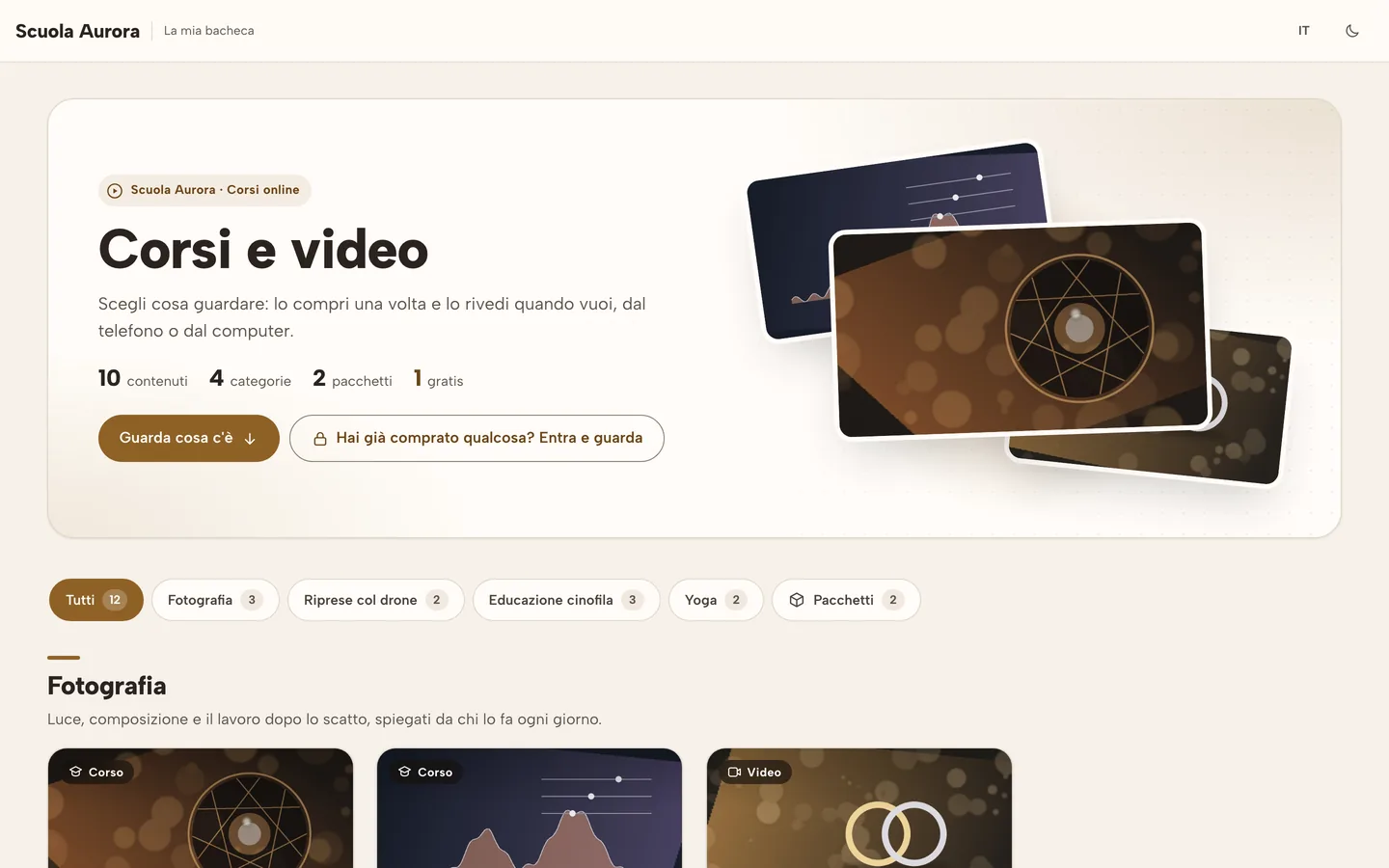
Real screenshots of RegiaPro. The studio, courses and students are made up.
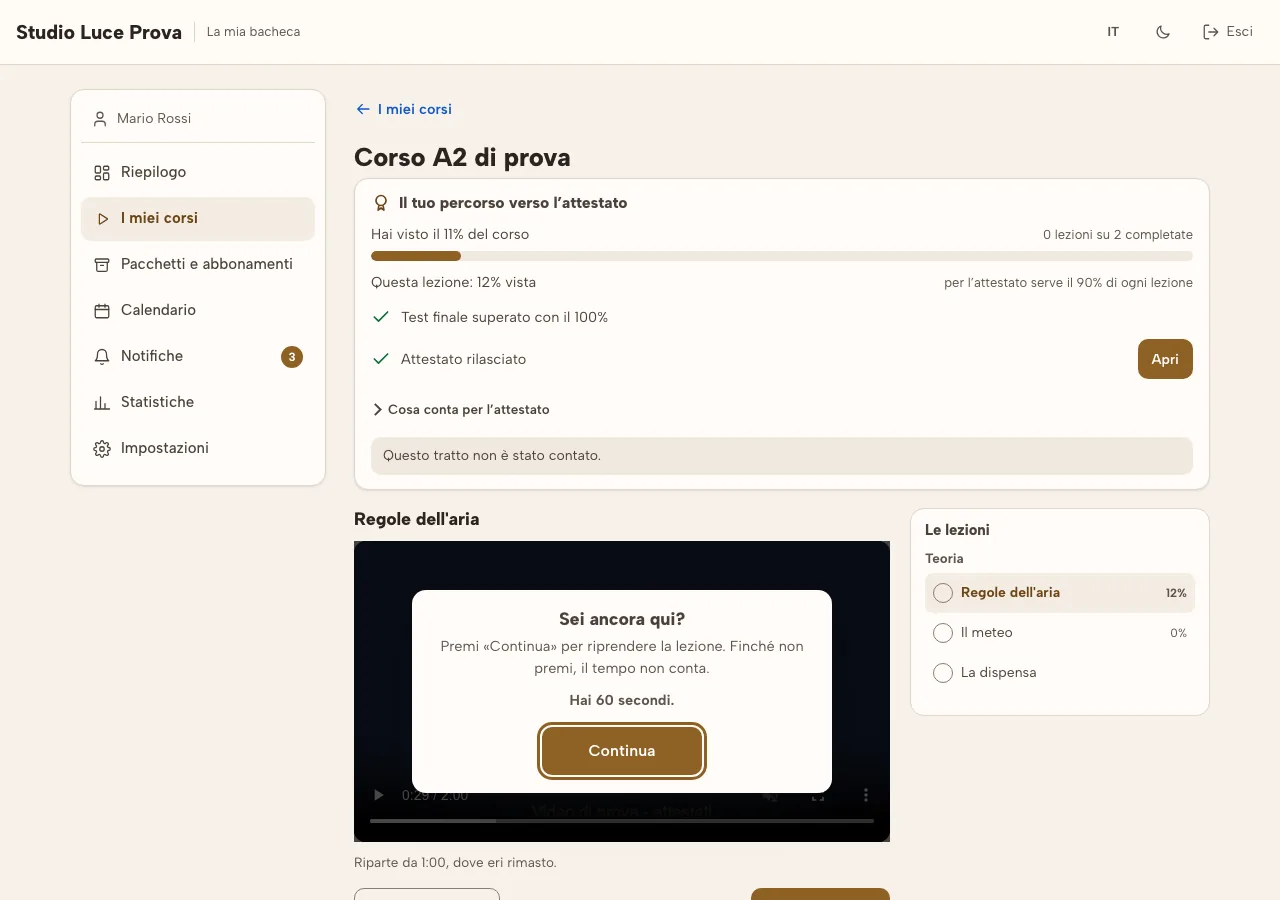
The live lesson, paid, with a waiting room.
You create the event with seats and a price, and RegiaPro takes care of the page, checkout and reminders. Go live from your browser or with OBS; once the live stream ends, the recording goes back into the catalog.
- Live streams for many, webinars for a few in the room, plus a free open live stream to help people find you.
- Email reminders 24 hours and 15 minutes before, and an “Enter” button that lights up on its own.
- The open live stream also on YouTube and your Facebook Page, and on Instagram and TikTok with the key they give you.
- 50 viewer-hours a month included with Pro: for example, a one-hour live stream with 50 people.
What we do not promise
Paid live streams on social media: anyone could watch for free. And live streams on Instagram and TikTok started automatically: those platforms don’t allow any program to do that. Live streams go live once your studio activates Cloudflare, the network that delivers the video; before that, you can already prepare and sell events.
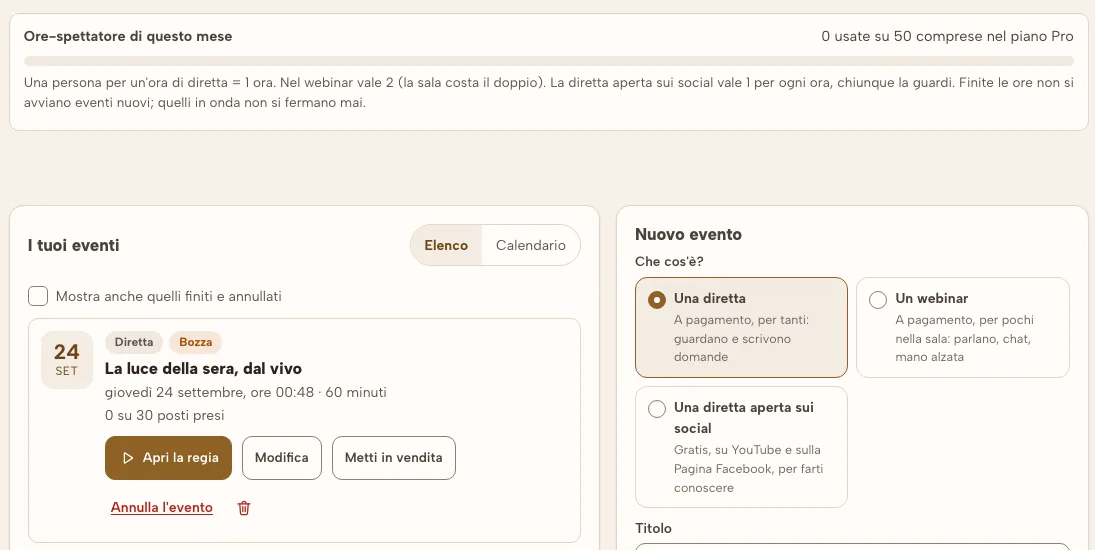
Real screenshots of RegiaPro. The studio, courses and students are made up.
Subscriptions that renew themselves, passes and bundles.
A month of lessons, the whole year, a ten-entry pass, a custom path. You decide which recorded courses, which live streams and which webinars it includes.
- Monthly or annual, with automatic renewal and, if you want, a free trial for the first few days.
- Pass and custom plans: ten entries to use by a set date, or a personal path for one student.
- Emails go out on their own: reminder before renewal, receipt, failed payment, access ended.
- The student handles it themselves: they change their card or cancel from their student dashboard.
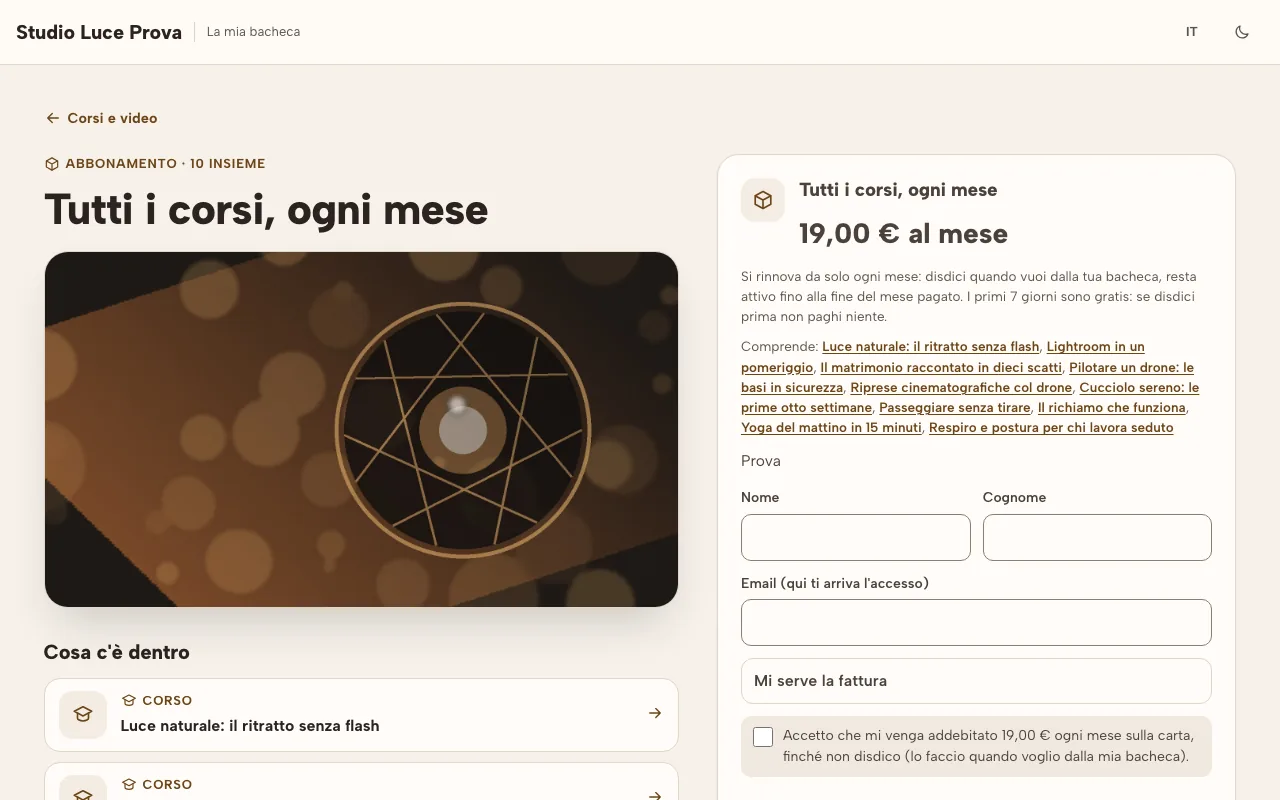
Real screenshots of RegiaPro. The studio, courses and students are made up.
The fastest way to know if you need it is to try it
Fourteen days with no credit card, on your own real clients.
It builds you a month of posts.
A profile that hasn't moved in three weeks isn't laziness: it's that at the end of the day, choosing the photos, cropping them for stories and writing the captions is a second job. RegiaPro Social builds the month starting from the photos you have already delivered to clients.
The limitation, said plainly
The last click — the one that actually publishes to Instagram — is still yours for now. The direct connection to Meta needs an approval that has to be applied for and granted, and until it is there we would rather write it here than let you believe the profile updates itself. Everything else — the choosing, the cropping, the caption, the queue, the reminder at the right moment — already works.
Close-up of the same screen, cropped to what matters.
Real screenshot from the software. Names, amounts and contact details are made up.