Inquiries stop getting lost. And the message is already written.
Everyone who contacts you becomes a record, and the record keeps everything in order of time: the phone call, the quote, the contract, the deposit. Every morning the software puts who to follow up today in front of you, with the draft message already written.
The problem is not finding clients. It is not losing them along the way.
One inquiry comes in on WhatsApp, another by email, a third one someone says to you out loud at a wedding. You answer them all the same day, and you have done well. Then Saturday comes, then the week of editing, and that couple who asked for a quote in March you never got back to — not because you did not care, but because there was nowhere to remind you.
- Inquiries sit in four different places, and nobody counts them.
- The quote sent in March nobody chases.
- When they call back six months later, you cannot remember where you got to.
- The quote, the contract and the invoice you write three times over.

Real screenshot from the software. Names, amounts and contact details are made up.
One record per person, and everything is in it
There is not one place for emails, one for messages and one for notes after the phone call: there is one list, in order of time. When that person calls back six months later, in three seconds you know who they are and where you had got to.
What you read from the top
- The three things that matter right away: the date of the shoot, when you have to follow up, and how much is still to come in.
- Where it stands: new, contacted, quote sent, negotiating, confirmed, lost, no reply.
- The right message for that stage, already written and ready to read before you send it.
- Deposit and balance counted separately, because they come in at different moments and often in different ways.

Real screenshot from the software. Names, amounts and contact details are made up.
Every morning, who to follow up today
It is the screen you open first. Not a list of everything, but the few people worth getting back to today, each with the message already written and matched to the type of shoot and the stage you are at. You read it, fix it if you want, send it.
The pacing, spelled out in full
After a quote the software suggests following up on day 3, then 7, 14 and 30: the gap widens as the chance of a reply drops, so the last contact does not read as badgering. After a first contact where the date of the shoot is still missing the pace is shorter — 2, 5, 10 — because there you are not asking for a decision, you are asking for a piece of information.
Two rules that matter more than the pacing
Never two follow-ups to the same person less than three days apart. On a neglected client every deadline has already passed: without this pause you would find the first, second and third follow-up all to send in the same afternoon.
No follow-ups in the week before the shoot. By then they would be badly timed, and whoever gets one can tell.

Real screenshot from the software. Above the list is the rule that does not change: the CRM does not send anything on its own.
The software never writes to your clients
It prepares and suggests. The last move is yours, always. It is not a missing feature: it is how it is built, and there is a practical reason to do with your phone number.
The message goes out from your number
RegiaPro opens WhatsApp on the conversation with that client, with the text already in it. You tap send. The message arrives from the number the client already has saved.
Why the software does not send it
A number can live on the phone app or on Meta's business channel, not both. Moving it to the business channel would cost you the app — and your clients would get messages from a sender they do not recognize.
You tell it how it went
After sending, you pick between "sent it", "they replied" and "no reply". From there the software decides whether to go on to the next follow-up, stop, or close it off.
And if they answer by phone
Write down what they told you in two lines: it lands in the client's history along with everything else, and the follow-ups stop on their own.
Quote, contract, invoice: written once only
The three documents come from the same record and the same details. You type the couple's name, the date, the place and the amount once: after that they carry themselves from one document to the next.
- 1
The quote
It is built from a template of yours, with your packages and your price lists. You send it with a link nobody can guess, and you know when it was opened.
- 2
The contract
It comes straight out of the accepted quote with nothing to retype, and lands as a PDF ready to sign.
- 3
The invoice
It comes out of the same place, with the numbering carrying on by itself. Invoices never leave the software on a public link: those are downloaded from inside only.
On contracts we are honest all the way
The person who wrote this software is not a lawyer, and the software tells you so before you use the template: it lists the seven points where a contract between a professional and a private client can be worth nothing — the right to withdraw, the clauses that need signing twice, the deposit being kept, the rights to the photographs, the people photographed, the privacy notice and the stamp duty.
It exists to help you ask your lawyer the right questions, not to replace them. A contract template that passes itself off as safe is more dangerous than no template at all.
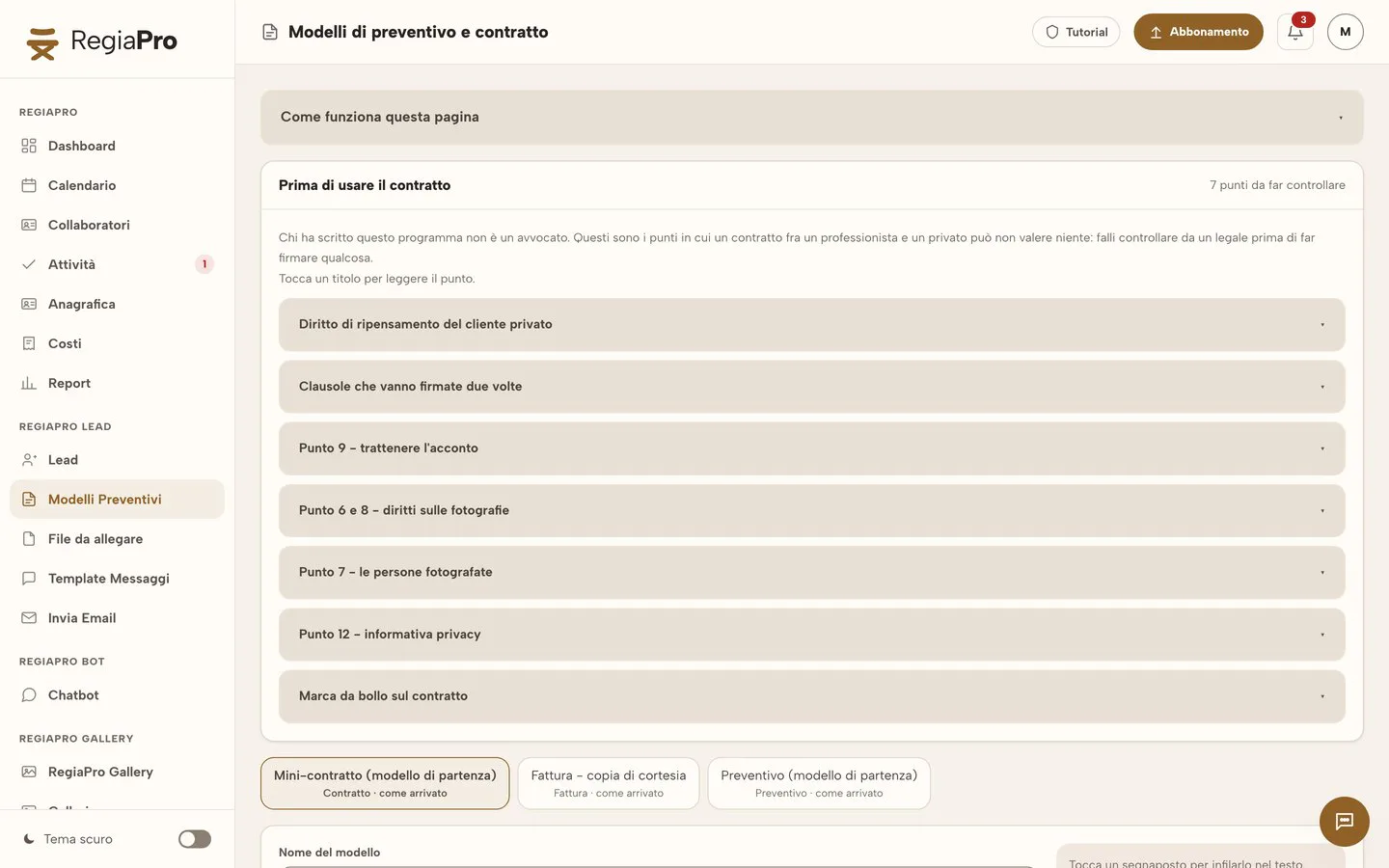
Real screenshot from the software. The warning at the top is not marketing copy of ours: it is what the photographer actually reads before using the template.
And then the day of the shoot arrives
It is the part almost no CRM does, and it is the one that lets you sleep the night before. On a confirmed job you write down the stages of the day — the bride's house, the church, the restaurant — each with its address checked.
The right church, not just any church
You search "St Michael's church" and you get the list of places by that name, each with its address and its town. You choose. Turning up in the wrong village on the morning of the wedding cannot be undone.
What time you have to leave
The software asks how long the journey takes at the time and on the day of your shoot, and tells you it is predicted traffic — not live traffic, which for a wedding eight months away cannot exist.
The note that becomes a reminder
"Rent the printer", "collect the permit": you write it in red at the top of the record and it becomes a reminder seven days before. If the shoot is in three days it appears straight away, which is when you need it.
The real costs of that job
The second shooter, the travel, and the out-of-pocket costs with a note of what they were. They come off your profit, they are not added to what the client pays. At the end of the year "380 euros" with no note of what it was tells you nothing.
The stages are only filled in on confirmed jobs: before that, the date and the place can still change. See what a whole day looks like with RegiaPro →
In December you know what is left, not just what came in
Revenue on its own tells you nothing. A €3,000 wedding with a second shooter, a hotel the night before and a hundred miles of travel makes you less than a €2,200 one round the corner. RegiaPro keeps the figures apart and only adds them up at the end.
- Job costs and studio costs do not get mixed. Renting a printer for that wedding comes off that wedding; an €1,800 lens belongs to the year, not to one client. If it landed inside a single job, that job would look like a loss and the lens would vanish.
- Travel is counted in full: distance, minutes, fuel, tolls and the cost of your time, there and back. It is not a rough guess: they are rates you set.
- Even the inquiries you do not win have a cost, if they come from a portal that charges per inquiry. The report tells you: how many you paid for and how many came to nothing.
- Collected and outstanding are two different things. Deposit and balance are recorded separately, each with its date and its method, because they come in at different moments.

A whole year. Real screenshot from the software. Names, amounts and contact details are made up.

The costs that belong to no client, split by category.
Three things nobody asks about first, and that count later
The calendar you already have on your phone
Appointments and shoot dates also land on your Google Calendar: the one you already open, not a second calendar to keep checking. You connect it once and then forget about it. If you do not connect it, the CRM does not call Google and it tells you so.
Who can open your documents
Quotes and contracts are sent with an address nobody can guess, and you know when it was opened. Invoices never leave the software: they are downloaded from inside, full stop. Price lists and packages, on the other hand, have a readable address on purpose: they end up in a WhatsApp message, and a link people can understand builds trust.
If you go five days without opening it
Nothing bad happens: when you reopen it, everything outstanding appears, in order, with how many days late it is. "Who do I follow up today" is a question asked at the moment, not a service running in the background — so there is nothing that can quietly stop working.
The calendar connection is switched on from the settings: for Google with the "Connect with Google" button, for iCloud with an app-specific password. How to connect it →
What changes from one plan to another
Client records and follow-up reminders are on every plan, including the smallest one. What changes is the rest.
| Start | Pro | Studio | |
|---|---|---|---|
| Client records | unlimited | unlimited | unlimited |
| Follow-up reminders | yes | yes | yes |
| Quotes | unlimited | unlimited | unlimited |
| Contracts as PDFs, ready to sign | yes | yes | yes |
| Invoices | no | yes; the Italian e-invoice as an add-on | yes, with 300 Italian e-invoices a year |
| WhatsApp numbers | yours | yours | yours |
| A year of invoices in one bundle | no | yes | yes |
The numbers come from the price list, and an automatic check makes sure the site and the price list never drift apart. Compare the plans row by row →
Questions about records and follow-ups
Do I have to change my work WhatsApp number?
No, and you would not want to anyway. RegiaPro does not send the messages for you: it prepares the right text and opens WhatsApp on the conversation with that client, with the message already written. You read it and tap send. That way the message goes out from your usual number, inside the conversation the client already has — not from a business number they do not recognize.
Does the software write to my clients on its own?
No, never. It prepares and suggests; sending is yours. It is not a setting to go looking for: it is a rule of the software, and it is written above the follow-up list — "the CRM does not send anything on its own: it prepares, you send, and you tell it how it went".
How often does it suggest following someone up?
After a quote: on day 3, then 7, 14 and 30. After a first contact with no quote: on day 2, 5 and 10. But two rules matter more than the pacing: never two follow-ups to the same person less than three days apart, and no follow-ups in the week before the shoot, because by then they would be badly timed.
Can I decide when to follow up, instead of the software?
Yes, and once you pick the date yourself the software leaves it alone. The pacing is there to suggest, not to overrule a decision already made. The same holds when you record a reply from the client: the follow-ups stop by themselves and getting back to them becomes your choice again.
Are the contracts that come out of RegiaPro valid?
The starting template is there, but the person who wrote the software is not a lawyer — and the software says so to your face. Before you use the contract it lists seven points where an agreement between a professional and a private client can be worth nothing: the right to withdraw, the clauses that need signing twice, the deposit being kept, the rights to the photographs, the people photographed, the privacy notice and the stamp duty. Have a lawyer check them before you get anything signed.
How does it know what time I have to leave for the shoot?
It asks Google for the time and the day of your shoot, and tells you plainly that it is predicted traffic — not live traffic, which for a wedding eight months away cannot exist. You search for the stages by name ("St Michael's church") and pick the right one from all the places by that name, with the full address and the town in front of you.
Can I import the clients I already have on an Excel sheet?
Importing from Excel or CSV is planned, but the rules aren't settled yet: which columns are needed, how many clients at a time, what happens to the ones already in there. We'd rather put that in writing here than simply promise the feature and let you find out afterward that it works some other way.
What happens to my records if I stop paying?
The plan goes read-only: you see everything, you create nothing new. The galleries are paused after thirty days. Nothing is deleted — that is a written rule, not an intention.
The other four modules
They are one piece of software: you write the client down here once, and they pass them between themselves.
The gallery that delivers the photos with a password and an expiry date, and the client marks the ones they want themselves.
Go to the pageRAW culling cut down to minutes: it groups bursts, suggests the best one and never deletes anything.
Go to the pageA chat on your site that answers visitors and fills in the enquiry for you.
Go to the pageIt builds the month's posting plan from the photos you have already delivered.
Go to the pageTry it on the next inquiry that comes in
Fourteen days with every Full feature, no credit card. The fastest way to find out whether you need it is to put the three or four inquiries you have open right now into it.