The webinar platform for your paid live lessons
Put your live lesson up for sale with seats and a price. Whoever signs up gets reminders, enters through the waiting room, and asks you questions. Once the live stream ends, the recording goes back into your catalog. And the free live stream to get you noticed can also go out on YouTube and your Facebook Page.
For teachers of their own craftphotographers and videographers, drone schools, dog trainers, yoga teachers, make-up academies
Live streams and webinarsSeptember
Latest activity
- Seat booked for “Studio lighting, live”
- Reminder sent to tomorrow’s attendees
- The recording is back in the catalog
- Free for 14 days, no card needed
- From your browser or with OBS
- Seats and price, decided by you
- Waiting room and reminders
- Viewers’ questions
- Attendance tracking
- The recording in the catalog
What the attendee does
- Books a seat and pays by card, while seats last
- Gets reminders the day before and fifteen minutes before
- Watches and asks questions from phone or computer, no app
- Watches it again later the recording, for 60 days
One webinar software, three ways to go live
When you create the event, you choose what it is. RegiaPro takes care of the rest — the page, the seats, checkout, and reminders.
The paid live stream
For many: you talk, they watch and write questions. Only whoever booked a seat can see it.
Lessons, presentations, live coursesThe paid webinar
For a few, in the room: they can speak too, raise their hand, write in chat.
Small classes, feedback sessions, group consultingThe open live stream on social media
Free, to get you noticed: it can also go out on your YouTube channel and your Facebook Page.
Presentations, Q&As, previewsPaid webinars in four steps, from the date to the recording
All from the “Live streams and webinars” page in your RegiaPro, inside “Courses and live streams.”
-
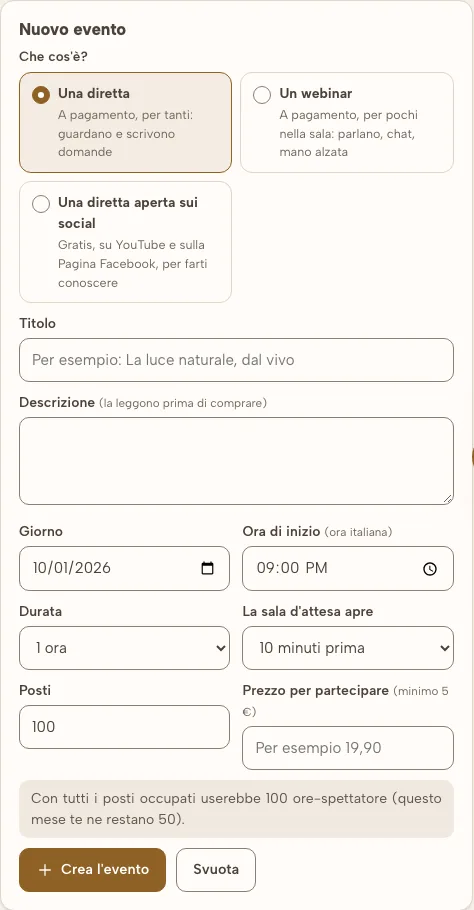
You create the event
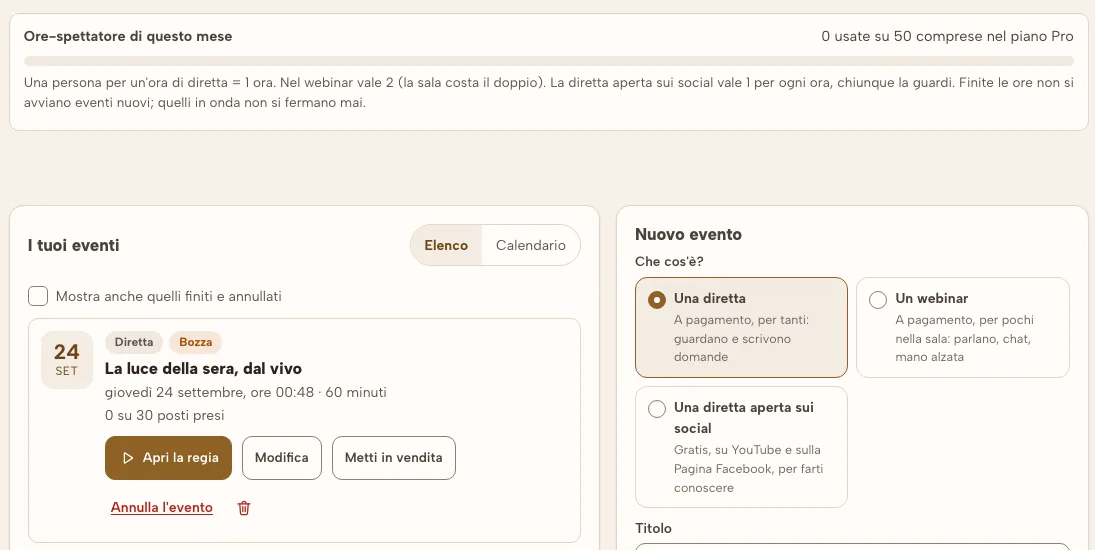
Day and time, duration, how many seats, the price, and when the waiting room opens. RegiaPro tells you right away how many viewer-hours it would use, if it fills up.
-
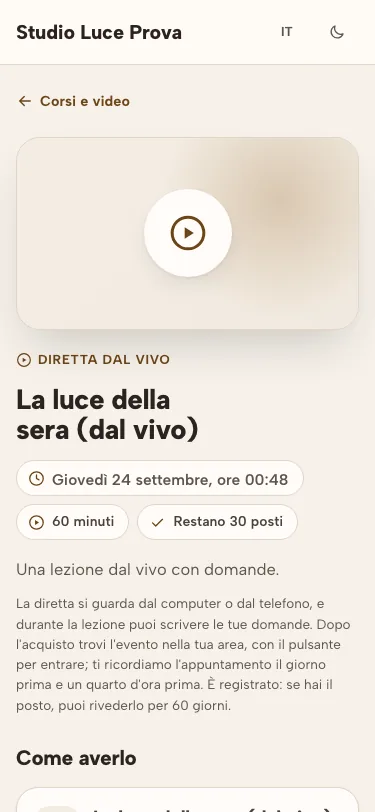
You put it up for sale
The live stream has its own page, with remaining seats, and is bought through the same checkout as courses. It can also be included in a subscription or a bundle.
-
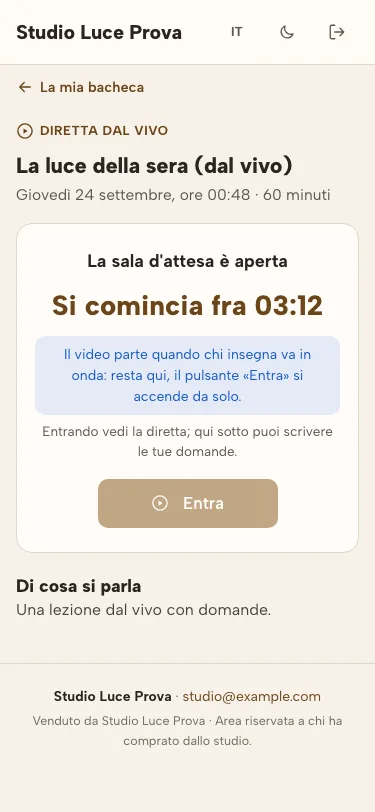
Waits in the room
“Add to calendar”, email reminders 24 hours and 15 minutes before, the waiting room with a countdown. “Enter” lights up on its own when you go live.
-
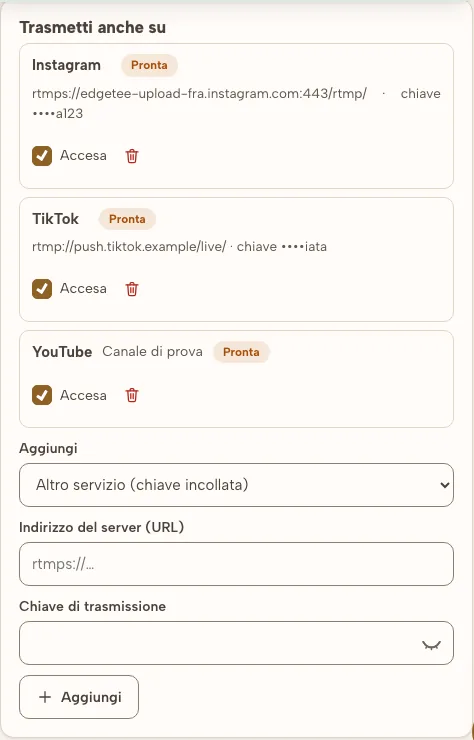
Go live
From your browser, with your camera, or with OBS if you have a production setup. You see who’s joined, the questions, and attendance tracking. Afterward, the recording goes back into the catalog.
Real screenshots of RegiaPro. The studio, courses and students are made up.
Want to try it with your next live lesson? In the 14-day trial you can already create a live stream, put it up for sale, and collect sign-ups, no credit card needed.
What you need for a live lesson
Viewers’ questions
They arrive in your control room: you highlight them, mark the ones you’ve answered, and hide the off-topic ones.
Attendance tracking
An “Are you there?” prompt during the live stream: live hours count toward the certificate of attendance.
One seat, one device
The ticket can’t be lent out: one seat is valid for one device at a time, and the viewer’s name scrolls across the video.
The recording in the catalog
Once the live stream ends, it becomes a video in your catalog, as a draft: whoever had a seat can watch it again for 60 days, and you decide whether to put it up for sale.
List and calendar
Live streams show up in a list or on the monthly calendar, separate from your jobs calendar: they don’t take up your date.
If you need to cancel
Cancel the event with a button and whoever had booked gets the email. No messages to write by hand.
The webinar software, screen by screen
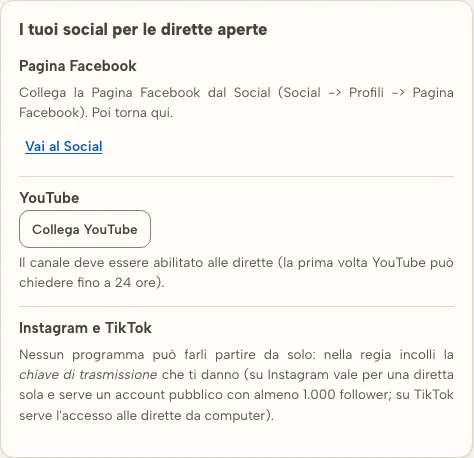
Real pages from RegiaPro’s live streams: the event list with viewer-hours, the form to create one, the waiting room and the sales page seen from a phone, and the control room with its outputs. Hover over them with your mouse to pause.
Real screenshots of RegiaPro. The studio, courses and students are made up.
One seat, one device
The link is only valid for whoever booked the seat.
The recording in the catalog
Once the live stream ends, it goes back among your courses.
Viewers’ questions
They come in while you’re speaking, and you answer whenever you want.
How much it costs, written up front
Live streams and webinars are available from the Pro plan up, and they’re already included in the 14-day trial. RegiaPro keeps a percentage on seats sold, just like on courses, and card payment costs are already included.
Profor those just starting to sell their courses
5%on every saleFull and Studiofor those who sell more: the percentage drops
4%on every saleViewing hoursincluded every month with the Pro plan
50viewer-hoursPaid webinars: how to organize one well
Six things to decide before putting your first live lesson up for sale.
-
A title that says what people will learn
“Studio lighting: three setups with a single flash” sells better than “September webinar.” Whoever buys a paid webinar wants to know what they’ll be able to do by the end.
-
Day, time and seats
Evenings after dinner or Saturday mornings work well for people with day jobs. A few seats suit the webinar, where you talk with those present; many seats suit the live stream, where people watch and ask questions.
-
A free live stream to get you noticed
Half an hour open to everyone, maybe on social media too, and at the end a link to the paid lesson. It’s the simplest way to fill your seats.
-
Test the light and audio the day before
From the browser, a webcam is enough; with OBS you can send two camera angles or your screen too. A five-minute test avoids a live stream that starts with no audio.
-
Set aside time for questions
Questions come in while you’re speaking: collect them and answer in the last ten minutes. People who paid want to hear their name when you answer.
-
Put the recording to work
Once the live stream ends, the recording goes back into the catalog: whoever missed it buys it as a video course, and whoever was there can watch it again.
Where the live stream travels through, and when it goes live
Live stream video travels over Cloudflare, one of the world’s largest networks for delivering video, with servers in Europe too. You don’t need to install anything, and viewers don’t need to download anything.
It switches on when your studio activates Cloudflare
Until then, you can already prepare live streams, put them up for sale, and collect sign-ups: the page says so clearly. “Go live” and “Enter” light up on their own as soon as Cloudflare is active.
| What | With RegiaPro | With a separate webinar program |
|---|---|---|
| The ticket | With RegiaProSold through the same checkout as courses | With a separate webinar programOften needs a separate ticketing site |
| Whoever signs up | With RegiaProBecomes one of your clients | With a separate webinar programStays in a list to export |
| The recording | With RegiaProGoes back into the catalog, ready to sell | With a separate webinar programA file to download and re-upload elsewhere |
Questions about live streams and webinars
Do I need to install anything to go live?
No. You go live from your browser, with your computer’s camera and microphone. If you have a multi-camera setup, you can use OBS: RegiaPro gives you the address and key to paste in. Viewers get in from their phone or computer, no app needed.
Can I do a paid live stream on YouTube or Facebook?
No, and that’s intentional: on social media anyone could watch it for free. Paid live streams stay in your room. YouTube and your Facebook Page get the open live stream — the free one you do to get noticed.
What about Instagram and TikTok?
Instagram and TikTok don’t let any program start a live stream on its own. For the open live stream, you paste in the key they give you: on Instagram it’s valid for one live stream only and needs a public profile with at least 1,000 followers; on TikTok you need access to live streaming from a computer.
How many people can watch?
You decide the number of seats for each event. What actually counts is viewer-hours: the Pro plan includes 50 a month, which is, for example, a one-hour live stream with 50 people. When you create the event, RegiaPro tells you how many it would use if it fills up.
Can someone who booked a seat rewatch the live stream?
Yes. Once the live stream ends, the recording goes back into your catalog as a draft video: whoever had a seat can watch it again for 60 days from their dashboard. If you want, you can put it up for sale as a video course.
When can I go live?
Once your studio has activated Cloudflare, the network that delivers the video. Before that, you can already create events, put them up for sale, and collect sign-ups; the “Go live” button lights up on its own once everything is ready.
The other two modules for teachers
Weighing up how to sell your courses? The page on selling online courses walks you through it, trade by trade.
Prepare your first live stream
Fourteen days of trial, no credit card. Create the event, open its page, and look at it through the eyes of someone signing up.
The free live stream on YouTube and your Facebook Page too
The open live stream helps you get noticed: you broadcast it from RegiaPro and the same picture also goes out on your social media, with no other program in between.
Said plainly
Paid live streams don’t go out on social media: otherwise anyone could watch them for free. Instagram and TikTok don’t let any program start a live stream on its own: there you need the key, and on Instagram a public profile with at least 1,000 followers. Automatic linking with YouTube and your Facebook Page switches on once Google and Meta give their permission; in the meantime, the pasted-in key works.