CRM and studio management software for photographers
RegiaPro is business software for photographers who live on weddings, christenings and booked shoots, with a built-in CRM that shows you every morning the couples waiting for your reply. The four-step setup starts with “Photographer” already selected: all you do is choose which features to switch on.


Built for more than 50 trades: this one is already set up for yours

Saturday 13 June: already booked
you see it before you write the quote
Today in RegiaPro
Example with made-up data
18
Enquiries
+6 this month
11
Dates confirmed
+3 this month
€3,450
To be collected
2 deposits on the way
New enquiry for 13 June
2 min ago
Contract signed, deposit recorded
yesterday
WhatsApp reminder ready for tomorrow
yesterday
- Free for 14 days, no card needed
- Works in the browser, on your phone too
- Calendar synced with Google and iCloud
- WhatsApp messages already written
- Invoices from your Fatture in Cloud, from the Pro plan
- Public prices, the same for everyone
Type of work
What do you do? If you can’t find yours, the last option is just fine.
What do you need? The basics for CRM and studio management software for photographers are already on. Switch on what you really need: we pick the plan from here.
Your RegiaPro is ready.
Tap a plan: below you see what is inside.
There is only one price list. Photo galleries come with every plan: if you don't deliver photos you simply don't open them, and the price stays the same. Compare all the plans
What you get with
The menu
An enquiry record
The fields of your trade are highlighted
The stages of the job
Where every job stands, at a glance
For a wedding photographer, a couple stays in the diary for more than a year. The first enquiry arrives in winter, the quote changes two or three times, the contract is signed together with the deposit, and after the wedding come the gallery, choosing the photos for the album and the balance. Photographer software is there to hold that long road together: RegiaPro keeps it in one record per shoot, which you open from the studio computer or from your phone in the car. Plans start at €19.90 a month.

What you’ll find inside RegiaPro: from enquiry to the day of the event
One program for enquiries, documents, payments and the working day. Tap a card to see how it works.
-
One record per client
Calls, quotes, contracts and payments in date order: when they call back six months later, you know at once where you left off.
The Lead module -
Who to call back today
Every morning, the list of people to get back to, with the WhatsApp message already written. It goes from your own number, when you decide.
Follow-ups and messages -
Quotes from your own template
The PDF with your logo, sent as a link: you know when it was opened. If there is no reply, the program brings it back to you after 3, 7, 14 and 30 days.
The quote -
The contract without retyping
It comes from the accepted quote, with the details already in, and comes out as a PDF ready to sign. From the Pro plan.
Which plans include it -
The day of the event
The stops of the day with checked addresses and the time to leave, worked out on the traffic expected for that day.
The working day -
Delivery galleries
Photos delivered with your own link, with a password and an expiry date: the client views and downloads.
RegiaPro Gallery -
Deposit, balance and invoice
Deposit and balance are recorded separately, each with its own date. The invoice comes out of the record with numbering that carries on by itself: from the Pro plan, with the XML file from the Studio plan.
The plans compared -
The calendar you already have
Appointments and jobs in your phone’s calendar: RegiaPro connects to Google Calendar and iCloud.
The connected calendar -
What is really left
A job’s costs come off that job, the business costs off the year: in December you know what is left, not just what came in.
The figures of each job -
From your phone, on site
It works in your phone’s browser: open the client’s record and attach photos and documents, up to 15 MB each.
How it works
RegiaPro up close: the real screens
This is what the program looks like inside. Sample data: the clients, the jobs and the amounts are made up.




Software for freelance photographers and small studios: the shoots it covers
RegiaPro is built around the freelance photographer who works alone, or with a second shooter brought in for the busiest days. As soon as you sign in you find nine shoot types ready to go; for each one you set in Settings the days to deliver, the follow-up rhythm, how long the quote is valid and how long you keep the files.
Weddings: twenty days to deliver the photos
By default, twenty days to deliver after the wedding and one extra follow-up on the quote, at forty-five days: a couple choosing a photographer thinks it over longer than someone booking a party.
Christenings, birthdays and 18th parties shot in a few hours
Short shoots of a few hours with five days to deliver, often booked by families who already know you. If someone already in your client book writes about another job, the new record flags it and takes you to the old one.
Graduations and sports events to deliver fast
Tight deadlines: five days for a graduation, three for a match, because those photos only hit home while the party or the game is still fresh.
Photo shoots for businesses and estate agents
Corporate events and shoots for estate agents, where the one paying is often not the person in the photos. You link the company or agency as the billing party once, and its tax details appear on the proposal, contract and invoice for that shoot.
Photo, video and drone in the same shoot
In the “What you deliver” field you choose between photo, video and drone. Each ticked item becomes a separate delivery in “Tasks”, with the deadline counted from the event date. If you mostly shoot video, you’ll find your own page among the related trades.
Your photography studio’s first day in RegiaPro
Start with next season’s couples who have already signed: one record each, with date, time, town, amount and deposit received. Once the records are saved, RegiaPro sets up the post-event deliveries on its own and the calendar shows you which Saturdays are already taken.

CRM for photographers: couples’ enquiries, ready-made messages and follow-ups
The CRM side follows people from the moment they write to the moment they sign. Every couple has a status that tells you where the negotiation stands, and from that RegiaPro works out the right day to get back in touch.
Couples who ask “how much is it?” without a date
It happens all the time on Instagram. Set the record to “Contacted” and use the “Ask for the date” message: if no reply comes, you’ll find them among the contacts to chase after two, five and ten days.
Fourteen messages for couples, six stages on the record
On the record, messages are grouped by moment: First message, Ask for the date, Send the packages, Chase up, Confirm, Ask for a review. Tap “Open WhatsApp” and the text appears already written in the chat with that person; tweak it if you like and it goes from your own number. Every text can be changed in Message Templates.
The photographer’s quote is sent, and the couple goes quiet
Once the couple has your proposal, the software brings it back to you after 3, 7, 14 and 30 days, and for a wedding after 45 too. Two chasers to the same couple are always at least three days apart, and no chaser is suggested in the last week before the wedding.
How it went with the couple, in one tap
On the “Tasks” page every person to follow up has three buttons: “Done, I wrote” moves the next follow-up, “They replied” moves them to negotiating, “No answer” closes it and takes them off the list.
Where the couples who choose your studio come from
On each record you note the channel: Instagram, word of mouth, wedding fair, your website. When you close the year, the “Report” separates the channels that brought paying couples from those that only brought messages; and if a directory charges you per lead, it takes that cost off the margin.

Wedding photography quote: what to put in it and how to send it
A quote for wedding photography tells the couple how many hours you’ll be with them, who is shooting, where, what they’ll receive and when, and how much it all costs. It’s the document they compare with those from two or three other photographers, often on the sofa, in the evening.
What a couple looks for in a photography quote
- hours of coverage, from getting ready to the party;
- second shooter, if there is one;
- church, venue and travel between the two;
- rough number of photos delivered and turnaround;
- album: format, pages, copies for the parents;
- deposit required to secure the date.
What the shoot PDF looks like
On the record you enter the shoot type, date, town and agreed amount, then generate the PDF with the studio logo. The line on the document reads, for example, “Wedding on 18/09/2027 in Bergamo” with the figure; the items above go in the note, printed underneath. The quote’s validity in days comes from the shoot type. Under Italy’s flat-rate scheme VAT stays out; if you charge it, RegiaPro works it out of the price and the total stays the one you told the couple.
With or without the album: two versions for the same couple
If they ask for the price without the album, you change the amount and prepare another quote from the record: it takes the next number, and the earlier one stays archived exactly as it was sent.
The quote on its way to the couple
The proposal reaches the couple as an attachment to an email you send without leaving their record, and the status changes to “Quote sent” without you touching it. When the couple decides, you write in the “Package or offer accepted” field what they bought: months later it answers the question “did ours include the album?”.
Wedding photographer: one wedding followed month by month in the software
Below is a whole wedding, told month by month as the person running it inside RegiaPro sees it, on the Full plan. The couple, places and amounts are invented for the occasion: they show the method and don’t match any studio’s price list.
-
November 2026: Giulia writes via the studio website
Giulia writes in the chat on the studio website on 14 November: she is marrying Andrea on Saturday 18 September 2027, in a church in Bergamo, with the reception at a villa on Lake Iseo. The chat checks the diary, tells her that Saturday is free and, once it has her name and phone number, creates the record with date, town and source “website”. You find it the next morning.
Follow-ups and messages -
December: photography packages, a meeting and a second quote
You send the “Send the packages” message and set up a meeting. On 2 December you prepare the first quote, €2,900, with ten hours of coverage, a second shooter and a forty-page album written in the note. The couple asks to drop the second shooter: on 9 December a new €2,500 quote goes out, with a different number, and the first stays in the archive.
The quote from your template -
January 2027: the wedding contract and deposit
On 16 January Giulia and Andrea come back to the studio. The contract template fills in names, date, times, total, deposit and balance in their places; you print it and sign it together. They leave €700 by bank transfer, recorded as the deposit; the couple moves to “Confirmed” and on your Google Calendar 18 September is blocked from 10am to 11pm.
The contract, from the Pro plan -
August: the bride’s home, church, villa and site visit
On the confirmed record you mark the stops of the day, the bride’s home, church and villa, and RegiaPro plans the route on Google Maps and the time to set off. In the important note you write “site visit at the villa for the sunset light”: it becomes a reminder due on 11 September, seven days before the wedding.
Try it for 14 days -
September: the wedding day and the delivery date set
On 18 September you shoot. “What you deliver” said photos, and the software has already set delivery for 8 October, twenty days later. Had the wedding date moved, that deadline would have moved with it.
Try it for 14 days -
October: 640 photos in preview and the album favourites
On 5 October you upload 640 photos and put the gallery in preview: the couple browse them small and watermarked, without downloading, and heart their favourites for the album, up to a limit of 60. When they press “I’ve finished choosing”, you download the list of chosen files for your Lightroom filter and lay out the album.
RegiaPro Gallery -
November: the couple’s balance, gallery unlocked and a review
On 12 November the couple pays the €1,800 balance. You had switched on “Opens by itself when I mark the balance paid”: as soon as you record it, the gallery shows the full-size photos to download. You prepare the couple’s invoice straight away; two days after marking the delivery as done, “Ask for a review” appears among your tasks, with the message ready.
RegiaPro Gallery
Summary of Giulia and Andrea’s wedding (all invented)
| When | What happens with the couple | What you do in RegiaPro |
|---|---|---|
| 14 November 2026 | Message in the website chat | The chat checks the Saturday and creates the record |
| 2 and 9 December | Two proposals, with and without a second shooter | Quotes for €2,900 and €2,500, status “Quote sent” |
| 16 January 2027 | Signing at the studio and a €700 deposit | Contract from the template, deposit recorded, date on the calendar |
| August | Planning the day | Three stops with the route and a reminder for 11 September |
| 18 September | The wedding | Photo delivery set for 8 October |
| 5 October | Gallery in preview and album selection | 60 favourites, file list for Lightroom |
| 12 November | €1,800 balance | Gallery unlocked, invoice, review request message |
Wedding photography contract: deposit, delivery times and photo rights
The photography contract is the sheet the couple signs when they secure the date. In RegiaPro it is generated from the couple’s record from the Pro plan up, and you no longer copy out names, dates and figures by hand.
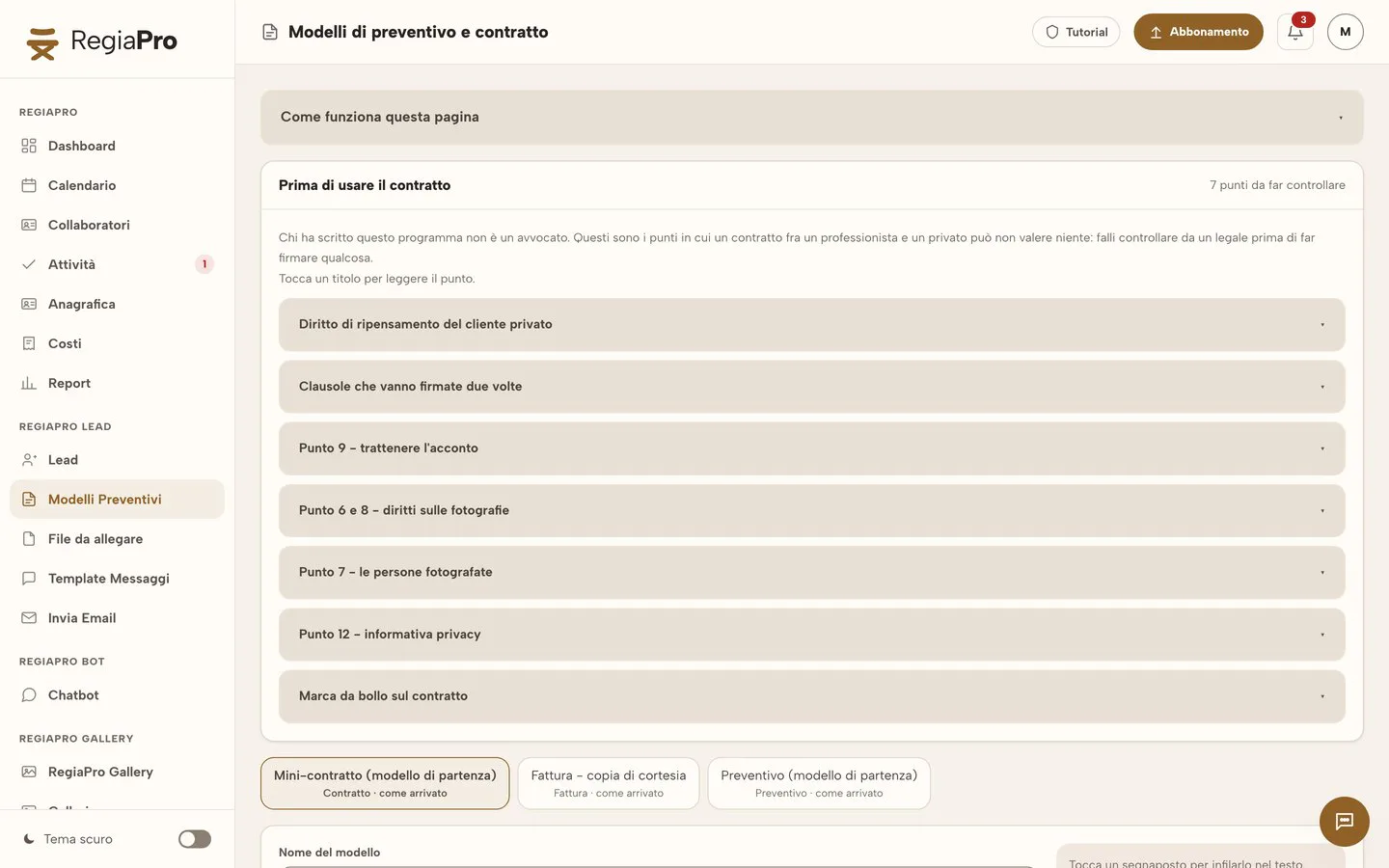
The photographer’s mini-contract with seven points to have checked
You’ll find a mini-contract ready to adapt, with seven points alongside to have a lawyer review before using it: the private client’s right to cancel, the clauses to sign twice, the retained deposit, the rights to the photographs, the people photographed, the privacy notice and the revenue stamp.
The placeholders that fill in the couple’s contract
Next to the template is the list of placeholders, each with its current value. Tap one and drop it into the text: the couple’s names, the payer’s details, date, start and finish time, town, package, total, deposit and balance come from the record when you generate the PDF.
Photo delivery times and file retention days
The delivery-days placeholder takes the number from the shoot type, the same one RegiaPro uses to work out the deadline after the wedding. In the same way it prints how many days you keep the files: what you sign with the couple matches what the software reminds you of.
The couple signs the photography contract in pen
The sheet is signed in pen: at the studio, when the deposit is paid, or you download the PDF, send it to the couple yourself and they bring it back signed at the next meeting. Once signed, you upload it to the record, next to the two versions of the quote.

Wedding albums and photo selection: the client gallery in your business software
Where a wedding usually gets stuck is choosing the photos for the album: lists of numbers read out over the phone, screenshots, renamed files. In RegiaPro the gallery sits next to the job record, and the selection arrives in writing.
The couple’s gallery link: password and expiry
For each gallery you create one or more links, with a password and whatever expiry you like, and you revoke them whenever you want. Three days before a link expires the CRM flags it; five days before, an email goes to the client automatically.
Hearted favourites and the wedding album limit
From the Full plan, the couple hearts the photos they want. If the album includes 60 and they pick more, the gallery points it out and they remove the extras themselves. The “I’ve finished choosing” button tells you when you can start.
From the list of chosen files to the Lightroom filter
You download the names of the chosen files as text ready to paste into the Lightroom filter, or copy the list in one tap: the layout starts from the right photos.
The preview gallery that helps you collect the wedding balance
In preview the client sees all the photos in a reduced size, with your watermark, and can’t download any. If you like, the gallery unlocks by itself the moment you mark the balance as paid.
Downloading screen-size photos and print originals
The client downloads all the photos in screen size straight away; for the print originals they leave their email and receive a link valid for seven days.
Studio logo, gallery style and photography portfolio
The gallery carries the studio logo, one of eight styles and the language you choose, Italian or English. You put your best galleries in the portfolio, the showcase with the studio’s name to send to people who don’t know you yet.
Guests’ photos via QR code and face search
From the Full plan, with Live Moments you put a QR code on the tables: guests send photos and good wishes, and you decide what goes into the couple’s gallery. On the same plan RegiaPro recognises faces, and tapping a face shows only the photos that person is in.

This is how the software’s Galleries page looks, filled in with two sample couples: at the top the new gallery and the showcase link, below the August deliveries.
Want to see it with your own work?
Fourteen days with the Full plan features, no card needed. Then you decide.


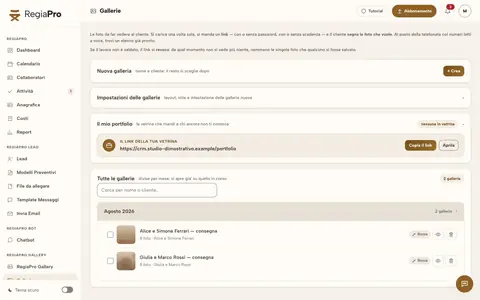

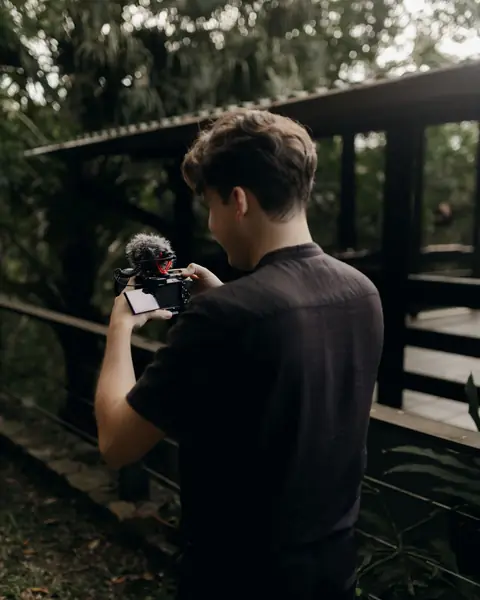




Free photos from Pexels and real screenshots of the software, with made-up data.
Photographer invoices, travel and margin: the numbers behind your shoots
In photography the money comes in pieces: the deposit in January, the balance in November, sometimes an instalment in between. Costs, on the other hand, bunch up in the month of the wedding.
The couple’s deposit, instalments and balance
Every payment from the couple is recorded with the day and how it arrived, bank transfer, cash or card, and the balance splits into instalments when the couple asks. In the list of shoots a badge tells you whether only the deposit has come in or the wedding is fully paid.
The photographer’s invoice, flat-rate scheme included
With Pro you issue the wedding invoice from the couple’s record: it takes the shoot amount, the payer’s details and the first free number of the year, and in January the counter restarts from one. On Studio you also get the XML file for Italy’s SdI e-invoicing system, to upload yourself or pass to your accountant.
The cost of travelling out to the reception villa
Next to the wedding town there’s the “Calculate” button. The journey is counted from the studio to that town and back; fuel, tolls and hours at the wheel are estimated on your own rates. You enter the Google Maps key once, in Settings.
Second shooter and printed album in the costs
The second shooter’s fee goes on the wedding record, with their name; the cost of the album ordered from the lab goes under out-of-pocket costs. On the Costs page, instead, you keep the studio’s outgoings that don’t relate to a couple, such as equipment and courses.
Your photography studio’s margin in the Report
The “Report” brings together payments received, amounts still due and costs, split into collaborators, travel, lead acquisition and job expenses, and tells you how much was really left, month by month and year by year. The table by shoot type, with the average per event, shows you whether weddings or christenings pay better.
Photography courses and workshops: sell them online from the same software as your weddings
Many photographers teach: a portrait workshop in the studio, a beginners’ course on Tuesday evenings, a sunrise photo walk, a video course on editing. Selling photography courses online usually means opening a separate platform with a second subscription, and the people who sign up never end up in the studio’s contacts. In RegiaPro courses sit next to clients, calendar and galleries: with the trade «Photographers and videographers who teach», «Courses and live sessions» is added at the top of the menu, and Galleries and RegiaPro Photo stay where they are.
Running photography workshops: from the enquiry to the gallery
Everyone who asks about the workshop gets a record, with their starting level and «In person» in the «How they attend» field. You send them the enrolment proposal as a PDF with your logo and, from the Pro plan, the enrolment form to sign. The day before, the WhatsApp reminder goes out, already written; the date is in the calendar, synced with Google and iCloud. That same evening the group’s shots go into a gallery, just like a couple’s.
How to create an online photography course
Start from what people ask you after every workshop: skin in post-production, backlight, exposure. Split the topic into short lessons, one thing per video, and upload them from «Courses and live sessions». Decide whether to sell them on their own or as a bundle, and put the catalogue on your website, WordPress included, with the RegiaPro widget. Buyers pay by card, and the money goes to the studio’s account.
Video courses only paying students can watch
Lessons can only be watched by those who bought them, or who got them from you as a gift: for example your workshop students, as a refresher. Buyers go into your contacts, with reminders, just like a couple who asked you for a quote.
Live sessions, reviews and subscriptions
Reviewing students’ photos, the lesson on light, the questions after the beginners’ course: you run them live from the browser, as paid sessions, and only those who signed up can watch, with no meeting software. For those who want to carry on there is a monthly review subscription, or a lesson pass: expiry and renewal emails go out on their own.
The course certificate of attendance
You set the rules: how much of the videos must really be watched, how many minutes of attendance at live sessions, whether there is a final test. When the student meets them, the certificate is issued automatically, as a PDF with the studio’s logo and signature, a code and a QR code for checking it. It states that it certifies attendance: it is not a professional photographer qualification.
What the studio keeps
Courses open from the Pro plan. On every sale RegiaPro keeps 5% on Pro and 4% from Full up, with a minimum of €0.50 and card fees already included: on a €59 video course that is €2.95 on Pro and €2.36 on Full. Free courses cost nothing.
If you teach other things too, you’ll find every step, from the first course to the first renewal, in the guide to selling courses online (in Italian).
How to start: three steps, no card needed
You sign up, try it on your real work, and only decide at the end.
-
Sign up in a minute
Your name, your business name and your email. We don’t ask for a credit card: access starts when you confirm your email.
Start the trial -
Set it up for your trade
Menus, record fields and job stages speak your language. You connect the calendar you already use.
Choose your trade here -
Try everything, then choose
Fourteen days with the Full features. At the end you choose a plan, or you stop: nothing renews on its own.
See the plans
Software for photographers: editing, galleries or business software with a CRM, and what it costs
Anyone looking for photographer software finds programs that do very different jobs. Among the top Google results, checked in mid-September 2026, three families stand out, and many photographers use them side by side.
| Developing and retouching | Gallery platforms | Business software and CRM like RegiaPro | |
|---|---|---|---|
| What it's for | Culling, developing and retouching files | Delivering and selling photos online | Following the client from enquiry to final payment, galleries included |
| Where you work | On the computer, with the original files | In the client’s browser | In the browser, on computer or phone |
| What it handles | Catalogues and adjustments | Galleries, selections, print orders | Records, quotes, contracts, deposits, invoices, galleries |
| RegiaPro price | — | — | From €19.90 a month, published on the pricing page |
Start, €19.90 a month: your first weddings with 50 GB of photos
€199 on the annual plan. Suits those who shoot a few weddings a year: unlimited client book for couples, follow-ups, WhatsApp messages, 10 quotes a month, 5 active galleries and 50 GB of photos, about eight weddings of 600 shots.
Pro, €34.90 a month: wedding contracts and 300 GB of galleries
€349 on the annual plan. Contracts and invoices for couples, chat on the studio website, scheduled Instagram posts, 40 active galleries and 300 GB of photos, enough for at least fifty weddings.
Full, €44.90 a month: favourites, Live Moments and faces for photographers
€449 on the annual plan. Hearted favourites with the album limit, Live Moments, faces, 70 active galleries, 450 GB of photos and 300 GB of video for those who also deliver films.
Studio, €59.90 a month: unlimited photo galleries
€599 on the annual plan. Unlimited active galleries, 1.5 TB for the photo archive, XML e-invoices and WhatsApp support.
To try it on a real couple you get fourteen days on Full, and no credit card is needed: access opens by itself as soon as you confirm your email. If the space then runs short, on any plan you can add 100 GB of photos for €5 a month (€4 on Studio) or 50 GB of video for €8, without changing plan.
Why you can trust it: your data stays yours
What matters before you put your clients into a new program.
Your data stays in Europe
On servers in Europe. Each business sees only its own data: the database itself enforces the separation.
If you stop, your data stays yours
The account goes read-only and nothing is deleted unless you ask. We send you a copy in a readable format.
Prices written up front
A public price list, the same for every trade: you can read it on the pricing page before you sign up.
You talk to a person
Born in a studio in Tuscany, not in an office. Write to info@regiapro.it or use the contact page.
Photographers’ frequently asked questions about RegiaPro
Can I use RegiaPro just for quotes and contracts, without the galleries?
Yes. Galleries are one part of the software, and records, quotes, contracts and invoices work even if you deliver photos another way. Many photographers start with enquiries and follow-ups, and open their first gallery when the next delivery comes round.
How does the couple choose the album photos?
From the Full plan they heart their favourites in the gallery, up to the maximum you set for the album, and press “I’ve finished choosing”. You download the list of chosen files and use it as a filter in Lightroom to lay out the album.
Can I change the delivery days for a wedding?
Yes, in Settings, type by type: by default it’s twenty for weddings and five for christenings and birthdays. Delivery deadlines are worked out from there and move by themselves if the event date changes.
Does the software write to couples by itself?
It prepares the right message for each stage and tells you who to send it to today. You tap “Open WhatsApp”, check the text and send it from your own number: every couple hears from the photographer they know.
How do I know if a Saturday is already booked?
Open the calendar and look at the “Free dates” panel: Saturdays already taken show the couple’s names. On Pro you can let the website chat do the same check, and when a day is taken it suggests up to three nearby alternatives.
Does the second shooter show up in the accounts?
Yes. On the wedding record you enter the second shooter’s name and fee: in the “Report” that figure is added to travel and out-of-pocket costs and taken off your takings, so you see the margin for the month and for each shoot type.
How much storage do I need for galleries?
A delivered photo takes up about 10 MB, because we keep the original, a web version and a preview. A 600-photo wedding therefore weighs around 5.8 GB: on Pro you can keep at least fifty, on Start about eight. If the space runs short, add 100 GB of photos for €5 a month (€4 on Studio) without changing plan.
What happens when I reach the maximum number of active galleries?
You archive a gallery that’s already been delivered and switch on a new one. Nothing is deleted in the archive: the client sees that the gallery is archived, and you reopen it when needed, for example if they ask for photos for a reprint.
Can I sell online photography courses with RegiaPro?
Yes, from the Pro plan: video courses, paid live sessions, subscriptions and bundles, from the «Courses and live sessions» menu. RegiaPro keeps 5% of each sale on Pro and 4% from Full up, with a minimum of €0.50 and card fees included. The fourteen-day trial already includes courses.
Can I deliver the photos taken at the workshop to the students?
Yes. You create a gallery with the group’s shots and send the link to the participants, just as you do with couples. Galleries stay in the menu when you switch courses on.
Last reviewed on 14 September 2026, with every feature retested inside the software. The couples, places and figures in the examples are fictional; the comparison between types of software sums up the search results read at the time. Notice a line that describes RegiaPro differently from how you see it? Write to info@regiapro.it and we’ll fix it.
Try the photographer software on your next wedding
Open the record for the next couple who writes to you and take it all the way to delivering the gallery: in two weeks you’ll know whether RegiaPro can handle your season. For fourteen days you have the full Full plan, then you choose your plan.
Trades that work alongside photographers: videographer software, wedding planner software and DJ booking software. Galleries have a page all of their own, RegiaPro Gallery, and guests’ photos are explained in Live Moments.